CFULLHDMA: Trying to understand decoding H.264

During the development of the CFULLHDMA I am always trying the best out of things. (= chipset + firmware). Knowing that not everything can be supported it is always a challenge to get the best.

Therefore my search for answers ..

Challenging the Sigma Designs 8635 chipset is one of the main things I like, especially as we know that the SDK of Sigma Designs is far from perfect.

SD 8635 does not support MKV, so this is added by a lot of manufactures themselves. The chip is strong in TS and MP4 .. 

We did some tests and got feedback from users: some certain files could not be played correct: during playback a lot of artefacts (squares) could be seen. In search for ansers why this happened a lot of debugging and research has been done.

In general this is what is happening: the filestream is forced to be played at H.264 High Profile @ L4.1 but the stream is a High Profile @ L5.x one and this is causing the artefacts.

The H.264 High Profile L5.x does need much more memory than the profile L4.1 (Blueray and HDDVD do use L4.1) ..  Also the ref frames have a role in this part: the more ref. frames, the more issues can be expected.

So in search for solutions it’s being checked if enough power/memory can be made available to decode the H.264 High profile L5.x

So my first suggestion is to remux the stream from L5.x to L4.x and check the amount of ref. frames.

It’s also wise to check some forums. I think the L4.1 is the profile to choose.

note: I am not H.264 expert, so if someone has more info about difference between L4.x and L5.x: please give me some hints


CH3SNAS: 1.04RC2 firmware

Release Candiate 2 1.04 firmware CH3SNAS

if this version is suitable enough it will be released on the Conceptronic website as 1.04 relaease.

In this firmware release:

UPnP Server instant update bug.

For freaks: the /usr/bin/inotify_upnp script was only be executed or running when the server was enabled and folder is ROOT, when enabling another folder, only prescan was executed. (Thanks Matthijs for doing some testings with me and having patience ;-) ).

Support for IFO, M2TS, TS, MKV etc. was added. Note: it’s extremely important that your media device is capable of working with UPnP AV with these extensions (especially on IFO and ISO part cause it can cause some issues when reading this data (unexpected UPnP AV feature).

A second remark is that you have to disable the UPnP server totally and reboot, so that the database will be updated removed and updated totally. Cause it’s possible that certain files are not being indexed or seen after disable / reboot / enable.

We also added a new feature in this 1.04RC2 release:

It is possible that a RAID1 enters a ‘DEGRADED’ status. Normally, after a reboot, the device will ‘RESYNC’ the HDD contents automatically. But in certain conditions the status will not change from ‘DEGRADED’ into RESYNC’ and you can only fix that when forcing the HDD to be member of the array again (fun_plug needed). The feature will only be seen when using your Harddisk in RAID1 mode.

A reboot is required for a forced resync.

Feedback is appreciated

Californication Season 2


Good news: the awesome funny hit-series Californication will have a Season 2 !! I really have enjoyed the 12 episodes of Season 1 and if you get the possibility to see this serie: do it !

It’s kewl, funny, rocking, sometimes too sexy but great!

Cast:

Hank Moody – David Duchovny (The X-Files)
Karen – Natascha McElhone
Becca – Madeleine Martin
Mia – Madeline Zima (The Nanny)  (WOW !)
Charlie – Evan Handler

CFULLHDMA: Trying to understand Samba

The Conceptronic CFULLHDMA has an automatical way of finding Samba Shares, to make life easy for customers. The device is using ‘smbtree’ for this purpose. smbtree is a text based network browser.

As I do a lot of testings I suddenly did not get any samba share to see on the CFULLHDMA anymore. Bummer, a bug? let’s find out …

Normally I have 6!! Samba shared devices in my network. Suddenly, after rebooting a PC (XP) and a NAS I lost all Samba shares to bee seen in my CFULLHDMA, reboot, turn off / turn on .. nothing helped.

Analyzing I found out following:

the smbtree was generating an error on the CFULLHDMA.

smbtree
session request to 192.168.1.30 failed (Called name not present)
Data overflow in cli_receive_trans

the 192.168.1.30 is my printserver, turning off that device only gave totally no output on running smbtree.

Using the same utility ‘smbtree’ on my Centos webserver (where aroundmyroom.com is running at) generated the same error. For me it meant that it was not a bug on my CFULLHDMA but a general ‘error’ within my network. Checking my network neighbourhood at my XP machine revealed only 1 samba share: a rebooted nas device I had to reset to factory defaults and modified on IP level again (fixed) and where I changed its Samba Share name as well. The rest of my shares were even not seen at my XP system, Linux Server or CFULLHDMA.

To solve the issue I did following:

I rebooted my DSL modem (router / dns / dhcp device) &

Announcement: CFULLHDMA beta firmware 1.09.10

To be released to beta testers later today:

Version 1.09.10

  • fixed: Volume level was / is not saved after turning off the device.
  • fixed: ISO could not be played anymore through SAMBA and USB HDD
  • Fixed: Movies and Subtitles with lots of ‘dots’ in the filename and in the same folder was only displaying the subtitle at first file. Rest of the files could not display the subtitle file.
  • fixed: Solved stream issue: stop playing after the advertisement check with: http://217.196.35.12/pls/mp3/skyradio.pls stream

v1.09.09 internal release, not released.

Note: beta testers have reported issues with some MKV files. They are still under investigation / debugging

CFULLHDMA & CH3SNAS: Using NFS

Simple how-to to use NFS together with the Conceptronic CFULLHDMA and Conceptronic CH3SNAS, a Full HD Mediaplayer & Network Storage device.

if NFS is abacadabra for you and you have no knowledge of Linux: do not worry, than this feature is not your thing.

NFS is mainly used for sharing data between Linux < – > Linux systems. NFS is a good way for quickly accessing data on a ‘local’ device.

So for the CFULLHDMA it means that we make the CH3SNAS part of the CFULLHDMA by ‘creating’ a folder in the file system of the CFULLHDMA with all the content available from the CH3SNAS.

First of all make sure you are using latest “Fun_Plug” on the CH3SNAS. I have used 0.5 which is working together with the 1.04a1 firmware (I used for my test). Copy the 2 files (see info at Fonz’ page) in the Volume_1 and reboot. The installation was successful if you see the FFP folder.

Download and use Putty (telnet client) and enter the shell of the CH3SNAS, for quick enabling UNFS3 User-Space NFS Server you use following command:

sh /mnt/HD_a2/ffp/start/unfsd.sh start

There is also nfsd.sh available, but probably due to some configuration settings in the firmware of the CH3SNAS it did not work, so preferred startup command is the above one.

You can edit your fun_plug by adding above command, after a reboot NFS is automatically started again. (Preferred).

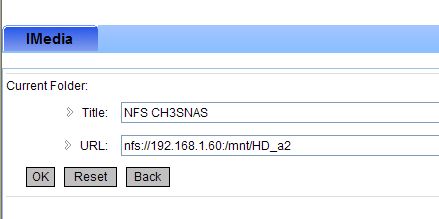
Now you have to configure your NFS share in the CFULLHDMA. To be honest: this is very very simple when you do it by your webbrowser ;-) using the remote is possible if no pc or keyboard is available. Good luck ;-)

http://[ip-address]:49152/web/IMedia

Next: create a new station. Enter a Name ie. NFS CH3SNAS

and the most important part is the URL to enter. By default the EXPORTS file of the CH3SNAS is sharing all folders, so pointing to the root is all you need to do.

nfs://192.168.1.60:/mnt/HD_a2

Press OK and your NFS share is saved.

Press the IMEDIA button on your remote or select it from your main menu, Select My Media, your NFS CH3SNAS is available now, select it and you will directly enter the Root (Volume)1 of your CH3SNAS