Back in the olddays guys liked Janet Jackson .. JB Remix made an awful rocking radio remix of Janet talking dirty with When I think of you
A rocking 2008 remix in about 4 minutes..
Back in the olddays guys liked Janet Jackson .. JB Remix made an awful rocking radio remix of Janet talking dirty with When I think of you
A rocking 2008 remix in about 4 minutes..
Since yesterday, Lilian has a new phone: Samsung SGH-i780 with Internet access and many more features.
Checking this site it was looking awful .. so I’ve modified my blog in such a way that when it detects a mobile phone it’s displayed properly. You can try it, if you have a mobile with Internet ..
Enjoy AroundMyRoom Mobile !

Good news: the awesome funny hit-series Californication will have a Season 2 !! I really have enjoyed the 12 episodes of Season 1 and if you get the possibility to see this serie: do it !
It’s kewl, funny, rocking, sometimes too sexy but great!
Cast:
Hank Moody – David Duchovny (The X-Files)
Karen – Natascha McElhone
Becca – Madeleine Martin
Mia – Madeline Zima (The Nanny) (WOW !)
Charlie – Evan Handler
The Conceptronic CFULLHDMA has an automatical way of finding Samba Shares, to make life easy for customers. The device is using ‘smbtree’ for this purpose. smbtree is a text based network browser.
As I do a lot of testings I suddenly did not get any samba share to see on the CFULLHDMA anymore. Bummer, a bug? let’s find out …
Normally I have 6!! Samba shared devices in my network. Suddenly, after rebooting a PC (XP) and a NAS I lost all Samba shares to bee seen in my CFULLHDMA, reboot, turn off / turn on .. nothing helped.
Analyzing I found out following:
the smbtree was generating an error on the CFULLHDMA.
smbtree
session request to 192.168.1.30 failed (Called name not present)
Data overflow in cli_receive_trans
the 192.168.1.30 is my printserver, turning off that device only gave totally no output on running smbtree.
Using the same utility ‘smbtree’ on my Centos webserver (where aroundmyroom.com is running at) generated the same error. For me it meant that it was not a bug on my CFULLHDMA but a general ‘error’ within my network. Checking my network neighbourhood at my XP machine revealed only 1 samba share: a rebooted nas device I had to reset to factory defaults and modified on IP level again (fixed) and where I changed its Samba Share name as well. The rest of my shares were even not seen at my XP system, Linux Server or CFULLHDMA.
To solve the issue I did following:
I rebooted my DSL modem (router / dns / dhcp device) &
To be released to beta testers later today:
Version 1.09.10
v1.09.09 internal release, not released.
Note: beta testers have reported issues with some MKV files. They are still under investigation / debugging
Simple how-to to use NFS together with the Conceptronic CFULLHDMA and Conceptronic CH3SNAS, a Full HD Mediaplayer & Network Storage device.
if NFS is abacadabra for you and you have no knowledge of Linux: do not worry, than this feature is not your thing.
NFS is mainly used for sharing data between Linux < – > Linux systems. NFS is a good way for quickly accessing data on a ‘local’ device.
So for the CFULLHDMA it means that we make the CH3SNAS part of the CFULLHDMA by ‘creating’ a folder in the file system of the CFULLHDMA with all the content available from the CH3SNAS.
First of all make sure you are using latest “Fun_Plug” on the CH3SNAS. I have used 0.5 which is working together with the 1.04a1 firmware (I used for my test). Copy the 2 files (see info at Fonz’ page) in the Volume_1 and reboot. The installation was successful if you see the FFP folder.
Download and use Putty (telnet client) and enter the shell of the CH3SNAS, for quick enabling UNFS3 User-Space NFS Server you use following command:
sh /mnt/HD_a2/ffp/start/unfsd.sh start
There is also nfsd.sh available, but probably due to some configuration settings in the firmware of the CH3SNAS it did not work, so preferred startup command is the above one.
You can edit your fun_plug by adding above command, after a reboot NFS is automatically started again. (Preferred).
Now you have to configure your NFS share in the CFULLHDMA. To be honest: this is very very simple when you do it by your webbrowser ;-) using the remote is possible if no pc or keyboard is available. Good luck ;-)
Next: create a new station. Enter a Name ie. NFS CH3SNAS
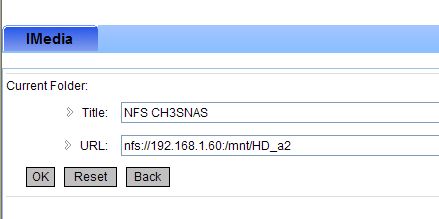
and the most important part is the URL to enter. By default the EXPORTS file of the CH3SNAS is sharing all folders, so pointing to the root is all you need to do.
nfs://192.168.1.60:/mnt/HD_a2
Press OK and your NFS share is saved.
Press the IMEDIA button on your remote or select it from your main menu, Select My Media, your NFS CH3SNAS is available now, select it and you will directly enter the Root (Volume)1 of your CH3SNAS

De Paris Hilton van het Gooi, kopt de Telegraaf vandaag. Ik ben eerder benieuwd wat het uitzicht was van de fotograaf, want als ik dat korte witte rokje zo zie met de positie van haar benen .. D’r zal vast en zeker meer dan 1 foto gemaakt moeten zijn.
Naja.. blond, rijk .. naja .. alle vooroordelen ….
v1.09.08
Quick adding NFS links or other imedia url’s can be done through:
Was het eerder deze week de grote DSL (ATM) storing van het KPN (Bitstream) netwerk, zo hebben ze net aan het eind van de week alle abonnees een feestelijke mailing toegestuurd waarbij de abonnees oa. een T-Shirt kunnen aanvragen met een code die bovenaan het adresveld vermeld staat.
Net als ik zijn er honderden, zo niet duizenden abonnees (ik ben al jaren lid sinds het UUCP tijdperk) weer de dupe dat deze ‘unieke’ code niet zo uniek blijkt te zijn als dat het zou moeten.
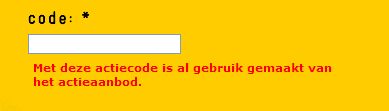
Gezien de usenet group: xs4all.general ben ik niet de enige
XS4ALL, vertellen dat elk lid een leuk kadoo krijgt en je met deze ongein opzadelen is niet leuk!
Finally one of the DSL lines we have at work, are operational again. One of our lines is XS4ALL ADSL ONLY and was not operational for more than 24 hours.. WOW .. what an outtage here in Holland