This time I tried to update WordPress by the auto upgrade function: WOW .. it worked !
Running beta software again ;_)
This time I tried to update WordPress by the auto upgrade function: WOW .. it worked !
Running beta software again ;_)
We have received a first proposal for our Holiday 2009 .. Reading 19 pages ….
I’ve managed to modify the updated unpak script from ydroll for the CH3SNAS with NZBGET. This one is much bigger and much worse to have it correctly implemented in the CH3SNAS (especially as there is a ‘catalog’ file included, which is different scripted and has less ‘hard-coded’ pathnames in it.
I’m not a script-kiddie, so Request for Help: the script in my folder is for experts only: you need to know what you are doing. I think the script is working for 95% and 5% gives probably issue on the catalog part. So if someone is able to modify the script / idea of ydroll so that many users of the Ch3SNAS can use it: help is appreciated on the UNPAK1 (the standard version I also use) and UNPAK2 script.
Looking forward to modified scrips .. ;-)
Al het jeugdsentiment qua muziek komt hier tezamen: The Future Megamixes … 6 delen inmiddels
Geweldig !!!
Een gebruiker was erg blij met de installatie van NZBGET op z’n CH3SNAS .. Rick .. We gaan ervan genieten !!! .. Mjum .. Zoals je ziet: goed overgekomen. Muchas Gracias!
Sometimes it is possible that people brick their device and that it is not operational anymore.
The CFULLHDMA has a number of abilities to fix firmware version(s).
First:
with every boot the device is checking if the firmware file is valid. When it’s not valid you will see a blue screen with information to run the firmware upgrade again.
Second:
With latest firmware releases we have added a ‘fixed’ IP address when there is no network: 169.254.1.1 if you can ping this address after changing the IP of your Computer in the same range the kernel is still running and you still can fix your CFULLHDMA.
If you can ping it on it’s normal IP address (you might need an Angry IP Scanner tool) to determine it in your network, you can also use telnet
—- Only for kernel 2.6 Firmware Versions —
mount -t vfat /dev/sda1 /usb/usb0
./ForceUpgrade_k26 upgrade.bin
sync
The upgrade.bin is the latest firmware version you can download from the Conceptronic website
the ForceUpgrade tool can be taken from here
I do not suggest anyone to use this unless you know what you are doing.
In any other situation it is NOT possible to fix the firmware file without using a Serial Console Port
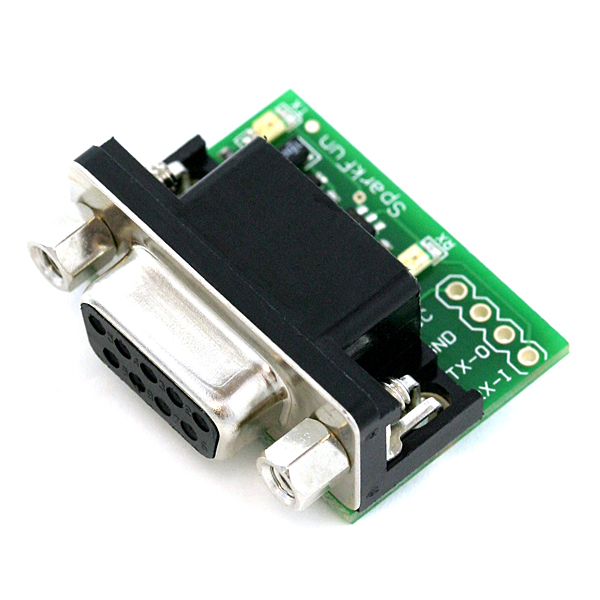
Above image shows a serial console port you can put on the CFULLHDMA when you open it. (Tx,Rx,GND,V). With a console port you can get more information about the status of the device. When you use a Console Cable and you see a YAMON message things are not ok .. the kernel and firmware are not present anymore. You only see the bootloader, and only through a very extensive difficult upgrade procedure the firmware can be fixed.
[this how-to is outdated !!!, You can use http://www.aroundmyroom.com/2009/11/14/just-a-howto-for-a-tweaker/
Zo … bezig met het overzetten van een stuk of 5 / 6 databases voor aroundtheworld.net straks als de DNS is overgezet maar even kijken of alles weer goed werkt.
Daarna maar eens wat websites van familieleden zien over te zetten.
The Just Before Chinese New Year Released Beta Version
1.15.01
changed: adding [ ] around items in list screen to give better view
Added: NTPClient server (for use with CFULLHDMAi)
Fixed: AC3 audio hickup passthrough
Fixed: Screen Saver issue (due to NTP)
Fixed: Ogg 6 channel issue
Fixed: DVD subtitle looping issue
Fixed: hang issue when connecting USB HDD.
Fixed:HDMI auto-sync caused there is no sound in HDMI when playing some files
Beta firmware only available for Beta-Testers
Perfect Advertisement, Perfect Scene & environment, watch the T-Mobile dance, Liverpool station. Here the Video.
What would have happened to you if you had been standing there without knowing that this would happen? ;-) that marketing guy who made this idea is smart l;-)